
How do you make a Discord bot auto translate messages?
Discord has no auto translate setting, so you add a translation bot to your server. With BabelBot, you choose the languages your members read in a web dashboard. Then you choose where translations appear: a reply under the message, a thread, or a repost that replaces the original with the member's name and avatar. After that, every new message translates, and nobody types a command.
- Reply in the channel
The translation appears under the message. Good for most chat channels.
- Thread per message
The channel shows only the originals. Good for announcements and support.
- Replace the original
The translation shows the member's name and avatar. Good when everyone reads one language.
Can Discord auto translate messages without a bot?
No. Discord has no setting that translates messages, on desktop, mobile, or web. User Settings > Language changes the menus and buttons of Discord, not what members write.
To translate a whole server, an admin adds a translation bot. The bot reads new messages in the channels it can see. It finds the language of each one and posts the translation in your target languages. Browser extensions and translator apps only translate for the person who installed them.
Does the bot translate for the server or for each member?
BabelBot translates for the whole server. An admin sets the target languages once, and every member sees the same translations. No member needs to opt in.
Some bots work per member. In Talksy, a member runs /talksy language to have their own messages translated into one language. Members who do not run it are not translated.
How do you set up auto translation with BabelBot?
Add the bot, choose languages, choose where translations appear, and send a test message. It takes about two minutes and no commands. You need the Manage Server permission in the Discord server.
BabelBot starts to translate when you add it. By default, it translates new messages in all text channels it can see into English. You can change this in guided setup.
Did you add BabelBot with Add to Discord on the website instead? Then select Set up BabelBot in the welcome message that BabelBot posts in your server.
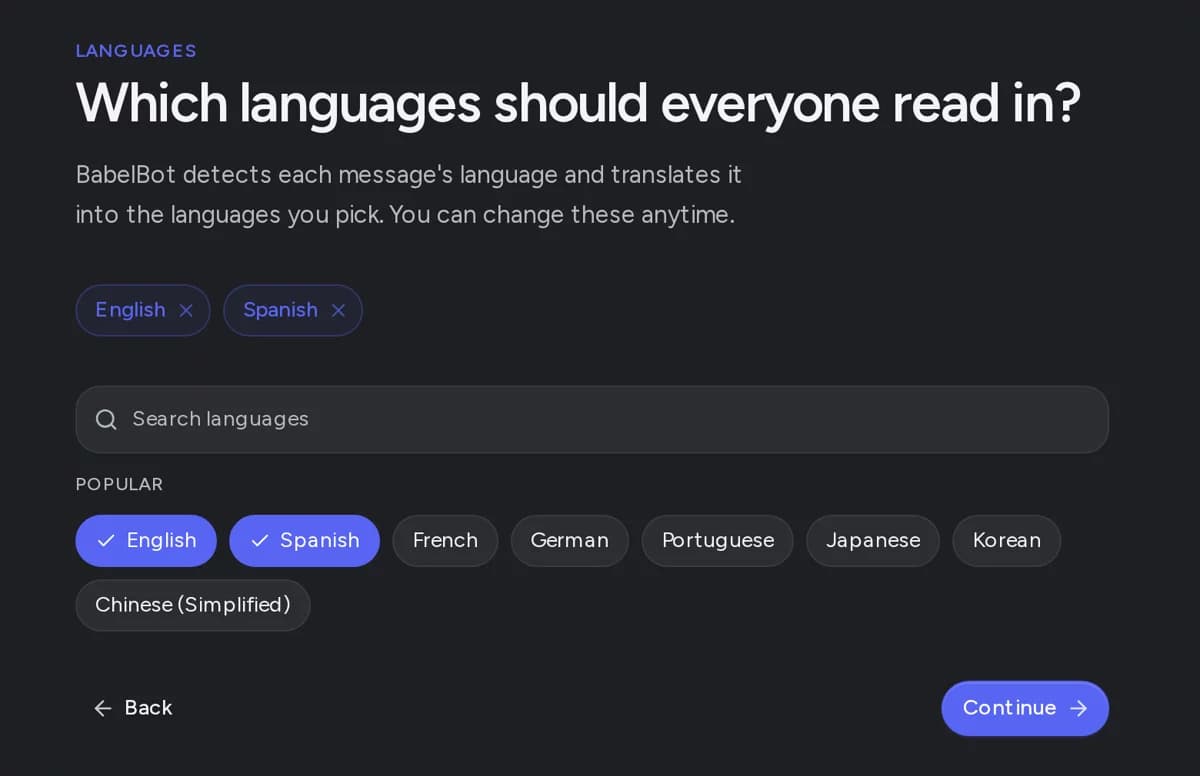
- Open guided setup in the BabelBot dashboard and select Add BabelBot on Discord.
- Choose your server, keep the permissions that Discord shows, and select Authorize. Discord sends you back to guided setup.
- Choose the languages your members read. Start with one or two.
- Choose Reply in channel or Group in a thread, then select Save and test. The dashboard calls these Reply in the channel and Thread per message. You can choose Replace the original there later.
- Write a full sentence in Discord in a language that is not a target language. If English is your only target, try "Bonjour, comment allez-vous ?". The translation appears in a few seconds.
- Later, open Translation > Automatic translation to choose the channel types. Text channels are on by default. Voice channel chats and forum posts stay off until you turn them on.
When should you use a reply in the channel?
Use a reply in most chat channels, including busy ones. The translation sits directly under the message, so members read the original and the translation together.
Choose a reply style. Plain text is compact and shows only the translation. With several target languages, each translation starts with a bold language label. Embed shows each translation in a styled card and needs the Embed Links permission. If a translation is too long for one Discord message, BabelBot moves it to a thread.
Who is joining the tournament tonight?
When should you use a thread per message?
Use threads in slower channels, such as announcements, support, or rules. The channel shows only the original messages. Each translated message gets its own thread, named after its languages, and members open it to read the translation.
Do not use threads in fast chat. Every message makes a new thread, and Discord limits how many active threads a server can have. Set Auto-delete threads after to clean them up. BabelBot needs Create Public Threads and Send Messages in Threads.
If a message is already in a thread or a forum post, BabelBot replies there. Discord cannot open a thread inside a thread.
When should you replace the original with the member's name and avatar?
Use Replace the original when everyone in the channel reads one language and you want the channel to look like a normal chat. BabelBot reposts each message as its translation with the member's name and avatar. Then it deletes the original.
With one target language, only messages in other languages change. A message that is already in the target language stays as it is. With several target languages, the repost shows the original text first and the translations below it.
Example: an English-speaking esports team signs a player from Brazil. The coach adds a channel rule for #team-chat only, with English as the target language and Replace the original as the reply mode. The player writes "Vou pegar o dragão agora", and the team sees "I'm taking the dragon now" with the player's name and avatar. The coach tells the player first that the Portuguese original disappears.
- Give BabelBot Manage Webhooks and Manage Messages in the channel, plus View Channel and Read Message History. Check channel overrides too.
- Tell your members first. They cannot edit the repost, and the link, timestamp, and reactions of the original do not move to it.
- Replacement works for automatic text translation in regular text channels. Attachments, polls, forwarded messages, announcements, and messages inside threads get a normal translation, and the original stays.
- BabelBot posts the repost before it deletes the original. If translation or delivery fails, the original stays.
- To stop, choose Reply in the channel or Thread per message. Originals that BabelBot already deleted stay deleted.
How do you translate into several languages at once?
Add more target languages on Translation > Target languages. BabelBot then translates each message into every target language except the one it is already in. Free allows 3 target languages, Pro 5, and Ultra and Founder Access 10.
Each language adds text under the message, so a channel with many languages gets long. If members split into language groups, link language channels instead.
How do you auto translate between Japanese and English channels?
You have two choices: one shared channel, or one channel for each language that BabelBot links. Both work for any language pair.
In one shared channel, set English and Japanese as target languages. An English message gets a Japanese translation, and a Japanese message gets an English one. BabelBot posts nothing for the language a message is already in.
Example: in a shared #general, Haruto asks "今夜サーバーのメンテナンスある?". BabelBot replies with the English translation and no Japanese line, because the message is already in Japanese. Sam answers in English, and BabelBot replies under it in Japanese.
With separate channels, link #english and #日本語 in a bridge on the Bridges page. Each message appears in the other channel, translated, with the member's name and avatar. Replies come back the other way, and edits and deletions follow. Free includes 1 bridge.
Is there server maintenance tonight?
はい、UTCの22:00から23:00までです。
How do you control which channels and members get translated?
Use Channel rules to choose channels and Ignored users to choose members. All settings below are in the dashboard.
- Translations switch on Overview: stops all automatic translation and bridges in the server, and starts them again with your saved settings.
- Channel rules: give a channel or a whole category its own target languages, reply mode, or flag reaction setting, or turn translation off there. A category rule also covers channels added to it later, such as new ticket channels.
- Skip languages: leave messages alone in a language that everyone already reads.
- Ignored users: stop translation of messages from some members or bots.
- Custom words: keep names, game terms, and product names as you want them. Free allows 5, Pro 25, Ultra and Founder Access 100.
- Flag reactions: a member reacts with a country flag to get one message translated into that country's language. You can turn this off for the server or one channel.
What happens when a member edits or deletes a message?
With Reply in the channel and Thread per message, BabelBot updates its translation when a member edits the original. When a member or moderator deletes the original, BabelBot deletes the translation too. This works for 30 days after the translation.
A thread stays after a deletion, because members can reply in it. An edit uses one AI translation, like a new message. In a bridge, edits and deletions sync to every linked channel.
Which other Discord bots auto translate messages?
Discord Translator, Talksy, and VibeBot also auto translate messages. They differ in setup, in who chooses the language, and in where the translation appears.
If you already use one of these bots and it works for your server, keep it. BabelBot fits when you want setup in a dashboard instead of commands, one setting for the whole server, a choice of reply, thread, or repost per channel, and edits and deletions that follow the original.
Discord Translator translates in the same channel or forwards messages to a Linked Group of language channels. You set it up in its dashboard or with -translate commands. Its free trial limits automatic translation to 2 languages. Discord Translator wiki, checked 2 November 2026
Discord Translator supports more than 100 languages and deletes translations when the original is deleted. Discord Translator website, checked 2 November 2026
Talksy turns on with /server enable and /server channel add. Each member who wants their messages translated runs /talksy language, and nobody is translated without it. Translations post with the member's name, avatar, and a flag. Its free plan includes 100 automatic translations a month. Talksy guide, checked 2 November 2026
VibeBot is a bot builder. Translation is a template in your own branded bot, posts replies or embeds in the same channel, and uses AI credits. VibeBot translator page, checked 2 November 2026
How much does auto translation cost?
BabelBot Free includes 100 AI translations a month and needs no credit card. Pro costs €9.99 and Ultra €19.99 a month per server. Each automatic message translation counts once, also with several target languages. A translation counts only when BabelBot posts it.
When Free runs out, translations pause until the 1st of the next month. Any member can vote for BabelBot on top.gg to get all 100 back at once. Translate Text keeps working, because it does not count.
- Free: 100 AI translations a month, 3 target languages, 1 bridge.
- Pro: €9.99 a month per server, 10,000 AI translations per billing period, 5 target languages, 5 bridges, and translation of images, PDFs, video, and voice messages.
- Ultra: €19.99 a month per server, 50,000 AI translations per billing period, 10 target languages, unlimited bridges, cross-server connections, and live voice chat translation.
- Founder Access: one payment, unlimited AI translations, and the Ultra features, for one server at a time.
Why does a message not get translated?
Most missing translations come from a setting, a permission, or a message that BabelBot skips on purpose. Check these in order.
- On Overview, make sure Translations is on.
- Make sure BabelBot can view the channel, read message history, and send messages there. A private channel can have its own permissions.
- On Translation > Automatic translation, check that the channel type is on. Then check Channel rules, Skip languages, and Ignored users.
- Send a full sentence. BabelBot skips a message that is already in the only target language. It also skips a message with only a link, emoji, or a short word such as "OK".
- BabelBot skips messages from other bots, except followed announcements.
- On Free, check that the server has translations left this month.
Common questions
Is there a free Discord bot that auto translates messages?
Yes. BabelBot Free gives a server 100 AI translations a month and 3 target languages, with replies, threads, and Replace the original. When they run out, a top.gg vote by any member resets them for that month.
Does the bot translate old messages?
No. Automatic translation works on new messages. To translate an older message for yourself, use Translate Text. To post the translation in the channel, react with a country flag.
Can each member read messages in their own language?
In BabelBot, the server sets the target languages, and every member sees the same translations. A member can translate any message into their own language with Translate Text. Only they see the result, and it does not use the server's translations.
Can I auto translate only one channel?
Yes. Turn off Text channels on Translation > Automatic translation. Then add a channel rule for that one channel with Translation status on.
Which permissions does a Discord translation bot need?
BabelBot needs View Channel, Read Message History, and Send Messages in each channel. Embed replies also need Embed Links. Threads need Create Public Threads and Send Messages in Threads. Replace the original and bridges need Manage Webhooks, and Replace the original also needs Manage Messages.
Does auto translation work on Discord mobile?
Yes. The bot posts the translations in the server, so members read them in the Discord app on any device. An admin can change settings in the dashboard from a phone browser.
How many languages can BabelBot translate?
More than 130. You choose up to 3 target languages on Free, 5 on Pro, and 10 on Ultra and Founder Access. BabelBot finds the source language of each message, so you do not set it.